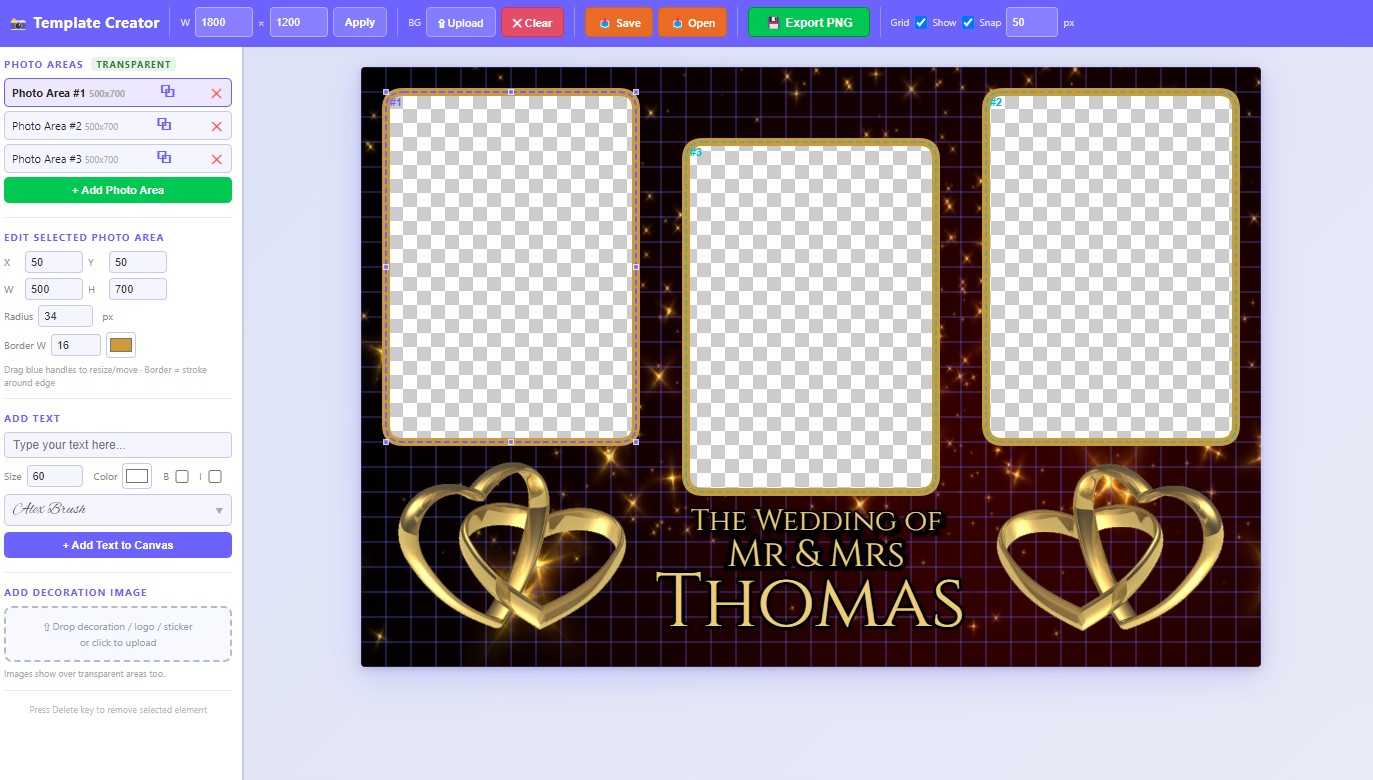
Create professional photo booth templates with custom cutout areas, text overlays, and backgrounds. Export as transparent PNG — no subscription required.
Demo is free · Exports include a watermark · 7-day trial
⚠️ Windows users: Windows may show a "Windows protected your PC" warning. Click More info then Run anyway — this is safe to dismiss.
See how easy it is to create stunning photo booth templates in minutes.
A complete visual editor — no design experience needed.
Add as many cutout areas as you need. Drag, resize, and adjust corner radius for any shape.
Pick from 200+ Google Fonts with a live visual font picker. Set size, colour, line height, shadow, and alignment.
Drag and drop images directly onto the canvas as backgrounds or decorations. Rotate and flip freely.
Export your template as a crisp transparent PNG — ready to use with any photo booth software.
Save your work as a .pbp project file and reload it anytime for future edits.
Enable a grid overlay with snap-to-grid for pixel-perfect photo areas.
Download a ready-made .pbp template, open it in the app and start editing immediately — no payment needed.
A portrait-orientation template with a single centred photo cutout area. Great for classic photo booth prints.
⬇ Download Free TemplateA landscape-orientation template with three side-by-side photo cutout areas. Perfect for strips and wide-format prints.
⬇ Download Free Template💡 Want more professionally designed templates? Browse the Templates Store →
Every licence comes with access to a growing template store, free downloads for owners, and a community of photo booth operators sharing their best work.
Browse a curated store of ready-made .pbp templates organised by size — 4×6, 6×4, Strips, 360 and more. One click and you're editing in the app.
Once licenced, you receive a unique member code. Enter it on the store page and every template becomes free to download — no basket, no checkout, just instant access.
Join a private WhatsApp group exclusively for Template Creator owners. Share your own templates, download what others have made, get tips, and help build a catalogue that benefits every member.
Already design in Canva? Now you can bring those templates straight into your photo booth workflow. Fill your photo zones with a solid colour, export as PNG, and our Canva Template Processor removes the colour and leaves perfect transparent cutouts — in seconds.
Create your photo booth template as normal in Canva. Design the borders, backgrounds, and decorations exactly how you want them.
Select each photo zone and fill it with a single vivid solid colour (e.g. bright red or magenta). The more distinct from the rest of the design, the better.
Export your finished design from Canva as a PNG file. Any resolution works — higher is better for print.
Log in to the Canva Template Processor with your purchase email, drop in the PNG, click a photo area to sample its colour, then hit Apply & Preview.
Download the transparent PNG and open it in Template Creator as your background overlay — your photo zones will be perfectly cut out.
The Canva Template Processor is a free bonus tool available to everyone who owns a Template Creator licence. Simply visit the tool and enter the email address you used to purchase — if your licence is active, you’re in. No extra cost, no separate account.
Download the trial, then when ready return here to purchase licence.
Run the installer and open Template Creator. You'll see your unique Machine ID on the activation screen.
Copy your Machine ID and fill in the activation form. We'll generate your personal licence key.
Enter your licence key in the app. The editor opens immediately — start designing!
Buy once. Own it forever. No recurring fees.
After purchase, scroll down and submit your Machine ID to receive your licence key.
After purchasing, follow these steps to activate your copy:
XXXXXX-XXXXXX-XXXXXXReal reviews from photo booth operators who use Template Creator.
Never come across a such a great software easy to use, especially when you are mid through an event and need to make changes to a design. Fast effect greet for my business. The support from Dave is spot on cannot fault this program nor Dave , great work look forward to more videos too🙂🙂🙂
Thank you Yasmin, glad you are finding it easy. I appreciate your custom
I’ve never created my own templates before – I usually just buy them from Etsy – but this has completely changed things for me. I’m not very tech-minded at all, so I was a bit unsure going in, but I found the system surprisingly easy to use. Everything is laid out in a way that just makes sense, even for a beginner.
What really stood out to me though was the support. I even spoke to Dave over the phone, and he took the time to answer all the questions I had without making me feel rushed or out of my depth. That kind of help is hard to find these days.
Honestly, I don’t feel the need to buy templates anymore. The support is outstanding – thank you!
Hi Mo, hope you are doing well. Thanks for the review, it was great chatting with you. You know where I am if you need any assistance or have any more questions
Looking forward to seeing your creations. Please feel free to join our WhatsApp community, there is a link on this page
Take care and thanks again
Kind regards
Dave
Highly Recommended!
I wasn’t too sure at first as I saw I had to use my own images, but it turned out to be really simple. I can download images from loads of places online and then just drag and drop them straight into the software, which makes the whole process quick and hassle-free.
One thing that really impressed me is the range of free templates included. They’re actually well-designed and give you a great starting point, so you’re not building everything from scratch. Downloading them is easy, and once they’re in the software, editing them is really straightforward. You can tweak layouts, swap images, and customise everything without it feeling complicated at all.
Hi Lorraine, your review is greatly appreciated. Glad you are liking the templates and are also making your own from scratch.
It is great to have you in the Template Creator Owners family.
If you haven't alread please feel free to join our WhatsApp community where we will be encouraging members to share their creations which will in time build a nice catalogue of templaes we can all use
Kind regards
Dave
I originally tried using Canva for this kind of thing, but honestly found it quite frustrating. To get transparent areas for photos, I had to mess around with layering or even use other software alongside it, which just made the whole process more complicated than it needed to be.
Switching to Template Creator was a huge relief. Everything is much more straightforward, and I can achieve the exact layout I want without jumping between tools. On top of that, it’s roughly half the price of what Canva charges annually, and the fact there’s no ongoing subscription makes it even better. It just feels like a much more practical and cost-effective solution.
Hi Sarah, thanks for taking time to review the software. Our goal was to make it easy and we have achieved ttha, and as you have mentioned the cost is less than a Canva subscription and you don't have any ongoing costs. Welcome to the Template Creator family :)
I’ve used a fair few design tools over the years, but nothing comes close to Template Curator. It has completely transformed the way I create templates for my photobooth setups.
The biggest standout is just how easy it is to use. Whether you’re a complete beginner or have design experience, you can jump straight in and start creating professional, eye-catching templates within minutes. The interface is clean, intuitive, and doesn’t overwhelm you with unnecessary complexity.
What really impressed me is how quickly you can go from an idea to a finished product. The tools are smooth, responsive, and perfectly tailored for photobooth layouts—everything just works. It takes the stress out of designing and actually makes the whole process enjoyable.
The results speak for themselves too—every template looks high-end, polished, and ready to impress clients. It’s helped elevate my business and deliver a better experience overall.
If you’re in the photobooth industry and not using Template C
Hi Matt thanks for the review, glad you are finding the software easy to use and it is helping you create templates quickly
Best Wishes
I can't recommend this software enough, its just saved me from looking silly & letting down a customer at a birthday party.
I arrived at the party & the customer decided at the last minute, that they wanted to change the template design.
Usually I wouldn't be able to edit or change the template, as I design all the artwork at the office and load it on the IPad in advance.
Luckily enough I've seen this software advertised so I thought I would give it a go & its a game changer, & so easy to use.
Within minutes of downloading the software I had the new template designed and checked with my customer.
With the new option to also download & use pre designed templates, all you have to do is edit the text and export the template.
At under £50 for a lifetime use, its a no brainer.
Thank you Sean, glad the software is proving easy for you and you are liking the free templates features.
I appreciate you taking time out of your day to leave a review
Best wishes